Transferring a domain away from DNSimple
Table of Contents
- Before starting
- 1. Unlocking the domain and requesting a transfer code {#1-unlocking-the-domain-and-requesting-a-transfer-code}
- 2. Starting the transfer at the gaining registrar {#2-starting-the-transfer-at-the-gaining-registrar}
- 3. Approving the transfer request {#3-approving-the-transfer-request}
- Have more questions?
This article describes the procedure to transfer a domain registered with DNSimple to another registrar. The term gaining registrar refers to the registrar where you want to transfer the domain, the losing registrar is the current registrar for the domain, in this case DNSimple.
Before starting
Warning
Once a domain transfer is started, you will not be able to change the name servers on the domain. If you want to change your name servers, you can do so after requesting the code. Once you provide the transfer code to the gaining registrar, you cannot make adjustments.
To transfer a domain to another registrar, the standard procedure requires you to:
- Unlock the domain & request the transfer code from losing registrar.
- Start the transfer at the gaining registrar.
- Approve the transfer request.
The first step is handled at DNSimple in one click. The other steps are the responsibility of the gaining registrar. We are unable to provide support for those steps.
The transfer code (also called authorization code, auth code, or auth info) is required to authorize the transfer of a domain name. The use of a transfer code is a common procedure for most TLDs – including all the gTLDs, such as .COM, .NET, and .ORG.
Some TLDs have different transfer procedures:
1. Unlocking the domain and requesting a transfer code {#1-unlocking-the-domain-and-requesting-a-transfer-code}
You can prepare your domain for transfer out in one click. This action will unlock the domain and send you the transfer code via email, if a transfer code is required.
The transfer code is sent to the email listed as registrant (owner) for the domain. Before proceeding, check the domain contact and update the email if it does not match an email you have access to.
Preparing the domain for transfer out
- If you have more than one account, select the relevant one from the account switcher at the top-right corner of the screen.
-
On the header, click the tab, locate the relevant domain, and click on the name to access the domain page.
-
Go to the registration section and click
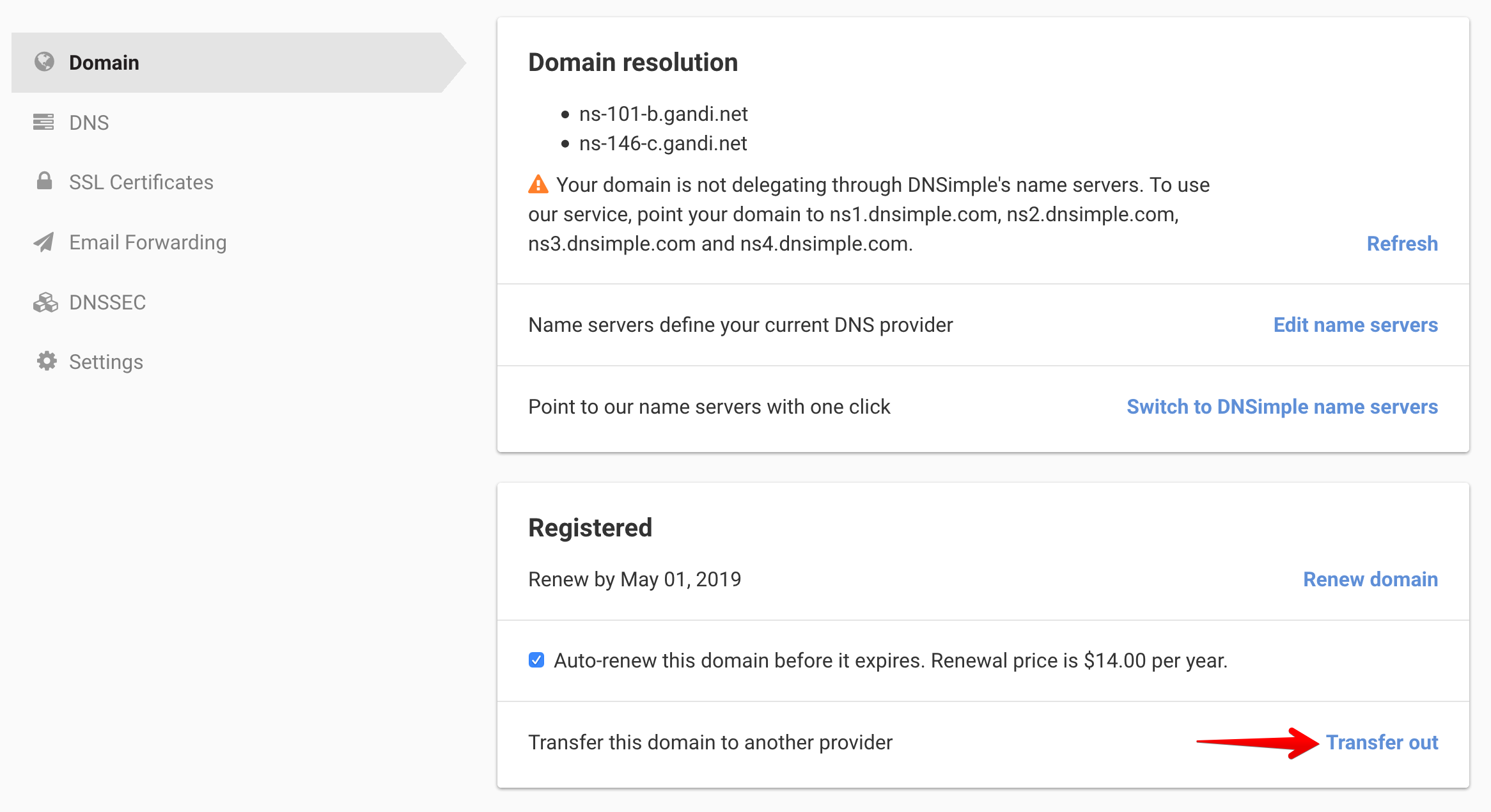
This will unlock the domain and, if applicable, email the transfer code to the domain registrant within 6 hours of requesting the code. Do not click more than once - this slows down the delivery process. Check your spam folder for the code if you do not see it in your inbox.
This email will be sent from the addresses DNSimple <donotreply@name-services.com> or DNSimple <support@dnsimple.com>. Consider adding these email addresses to your trusted contacts to ensure optimal delivery.
Resending transfer code
If you requested a domain transfer out and have not received a transfer code within the 6 hour period, please contact us and include your domain name in the email. For security purposes, we do not have access to view the code, and will not be able to expedite the code’s delivery. If the allotted time has passed, you have verified the email address is correct, and the transfer code is not in your spam folder, we will be happy to look into it and figure out why the transfer code has not arrived.
Note
Note: Once this step is completed, so has DNSimple’s role in the transfer process. All questions after this point must be directed to the gaining registrar.
2. Starting the transfer at the gaining registrar {#2-starting-the-transfer-at-the-gaining-registrar}
Once you have the transfer code, start the transfer at the gaining registrar. Requesting the transfer code will not automatically initiate a transfer out.
Follow the gaining registrar’s instructions to start a transfer, and enter the transfer code when requested.
DNSimple does not have access to this process. Contact the gaining registrar if you need help with this step.
3. Approving the transfer request {#3-approving-the-transfer-request}
Depending on the TLD, the gaining registrar, the losing registrar, or both may send you an email to confirm the transfer request. Verify that the information in the request is correct (especially the name of the gaining registrar), and confirm the request.
After the transfer at the new registrar is initiated, and the transfer code is provided, the transfer will be initiated at the Registry level. The registrar has 5 - 7 business days to release your domain(s). The transfer will automatically be approved at the end of this period. There is no way to speed up this process.
Once the transfer is approved, the domain(s) will now be with your new registrar and no longer with DNSimple.
Note
Note: If you are transferring your domain out of DNSimple, and no longer require any of our additional services, your account will remain active until you unsubscribe. This will not happen automatically.
Have more questions?
If you have any questions about transferring a domain away from DNSimple, just contact support, and we will be happy to help.