What Are System Records?
Last updated
System records are a specific set of DNS records that DNSimple automatically creates and manages for your domain when you add it to your account. Unlike other DNS records you configure yourself (like A, CNAME, or MX records), system records are fundamental to the proper functioning and resolution of your domain within the global Domain Name System.
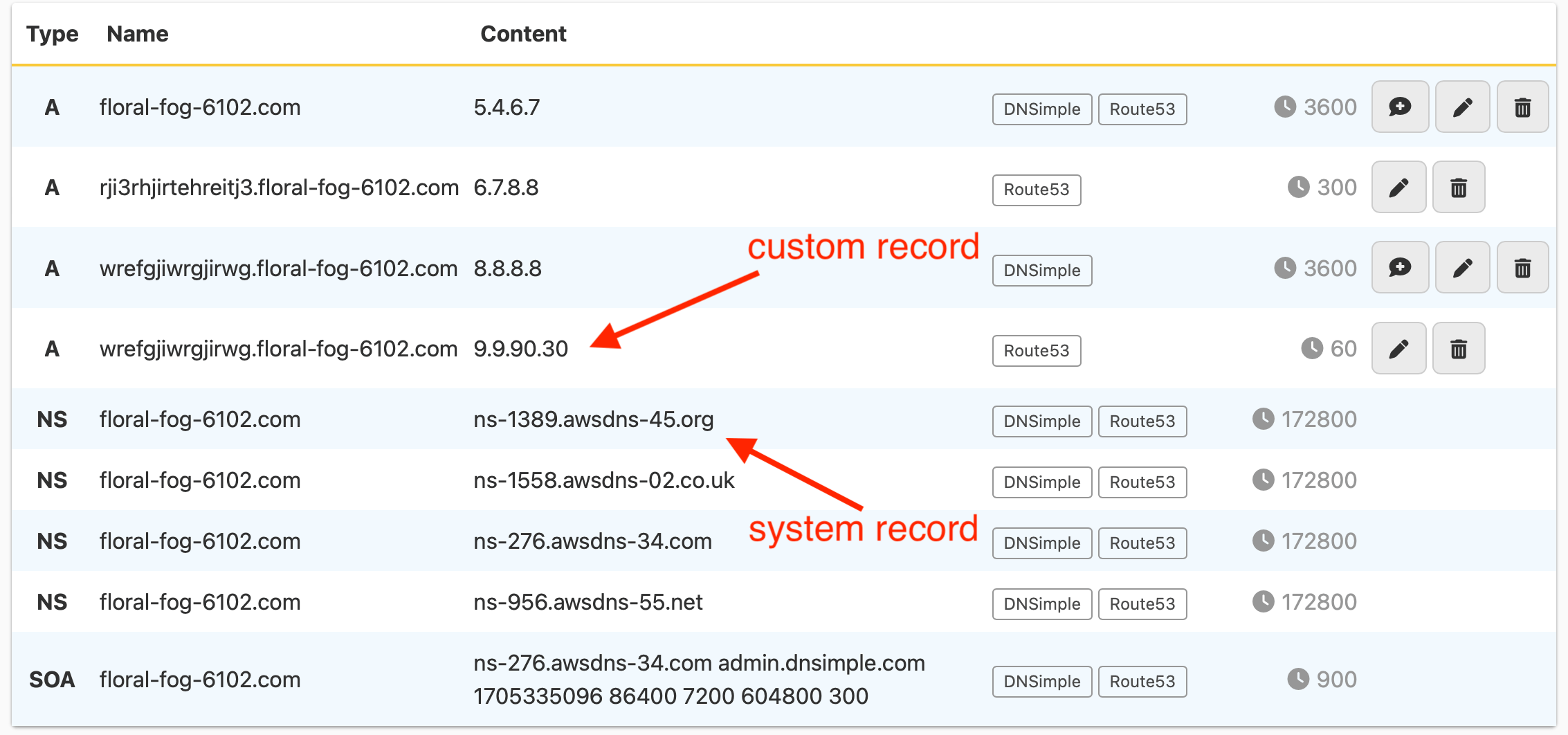
These records are managed directly by the DNSimple system to ensure optimal performance, reliability, and adherence to DNS standards. With DNS hosting at DNSimple, they appear in the record editor, but cannot be edited or deleted there.
What system records include and why they are necessary
When your domain is actively resolving using DNSimple’s name servers, the system records typically include:
SOA (Start of Authority) records
- Purpose: The SOA record is the administrative blueprint for your DNS zone. It contains vital metadata about the zone, such as its primary name server, the email address of the person responsible for the zone, and crucial timers that govern how frequently other DNS servers should check for updates (refresh), retry failed attempts, and when cached data should expire.
- Why it’s necessary: Without an SOA record, your DNS zone cannot be properly managed or synchronized across the internet, leading to resolution failures. DNSimple automatically optimizes these values for you.
- Learn more: What Is an SOA Record?
Four NS (Name Server) records
-
Purpose: These NS records identify DNSimple’s authoritative name servers (for example,
ns1.dnsimple-edge.comandns2.dnsimple-edge.net) as the source of truth for your domain’s DNS information. They should match the name servers your domain is delegated to at the registry. - Why they’re necessary: Every zone must list its own authoritative name servers. Resolvers can use these records, and if they do not match the delegation at the registry, resolution can become unreliable. To change them, use the card on the domain’s tab; see Updating Zone NS Records for a Hosted Domain.
- Learn more: What Is an NS Record?
System records appear in your domain’s record editor, marked with a system record icon. Their and actions are disabled, with the note “System records are managed by DNSimple and cannot be edited or deleted.”
Why system records cannot be edited
System records are non-editable in the standard record editor for several key reasons:
-
Ensuring reliability: They contain critical configuration details that, if misconfigured, could completely break your domain’s resolution, making your website and email inaccessible. DNSimple manages them to guarantee continuous service.
-
Standard compliance: The values and presence of these records must adhere to strict DNS protocols and best practices to ensure global interoperability. Automatic management prevents non-compliance.
-
Systemic management: Many updates to your zone (e.g., adding a new A record) require an increment to the SOA serial number. DNSimple’s system handles these behind-the-scenes updates automatically, ensuring your zone files remain consistent and synchronized with secondary DNS servers.
While you cannot manually modify these specific system records, any changes you make to your domain’s other DNS records are correctly reflected and managed in accordance with the system records. If you use vanity name servers, the system NS records and the SOA record list your vanity name servers instead, and DNSimple still manages them.
Have more questions?
If you have additional questions or need any assistance with your DNS records, just contact support, and we’ll be happy to help.