What is the SSL Certificate Chain?
The SSL certificate chain (also called the certificate chain of trust) is a series of certificates that links your server’s SSL certificate to a trusted root certificate. This chain establishes trust in your website’s identity and allows web browsers to verify that your certificate is legitimate.
How the certificate chain works
There are two types of certificate authorities (CAs): root CAs and intermediate CAs. For an SSL certificate to be trusted, that certificate must have been issued by a CA that’s included in the trusted store of the device that’s connecting (such as a web browser or operating system).
When a device validates a certificate, it follows this process:
- It checks if the certificate was issued by a trusted CA directly.
- If not, it checks if the certificate of the issuing CA was issued by a trusted CA.
- It continues checking up the chain until either:
- A trusted CA (root certificate) is found, establishing trust
- No trusted CA can be found, resulting in a security error
The list of SSL certificates, from the root certificate to the end-user certificate, represents the SSL certificate chain.
Components of the certificate chain
The certificate chain consists of three types of certificates:
- End-user certificate (also called server certificate): The certificate issued for your domain that you install on your web server.
- Intermediate certificates: One or more certificates that link the end-user certificate to the root certificate. These are issued by intermediate CAs.
- Root certificate: The top-level certificate issued by a root CA. Root certificates are embedded in browsers and operating systems and are the foundation of trust.
Why intermediate certificates exist
Root CAs keep their root certificates offline and secure to minimize the risk of compromise. Instead of issuing certificates directly, root CAs delegate issuance to intermediate CAs. This creates a security boundary: if an intermediate CA is compromised, only certificates issued by that intermediate CA are affected, not the entire root CA.
Intermediate certificates create the link between the root certificate and end-user certificates, forming the chain of trust.
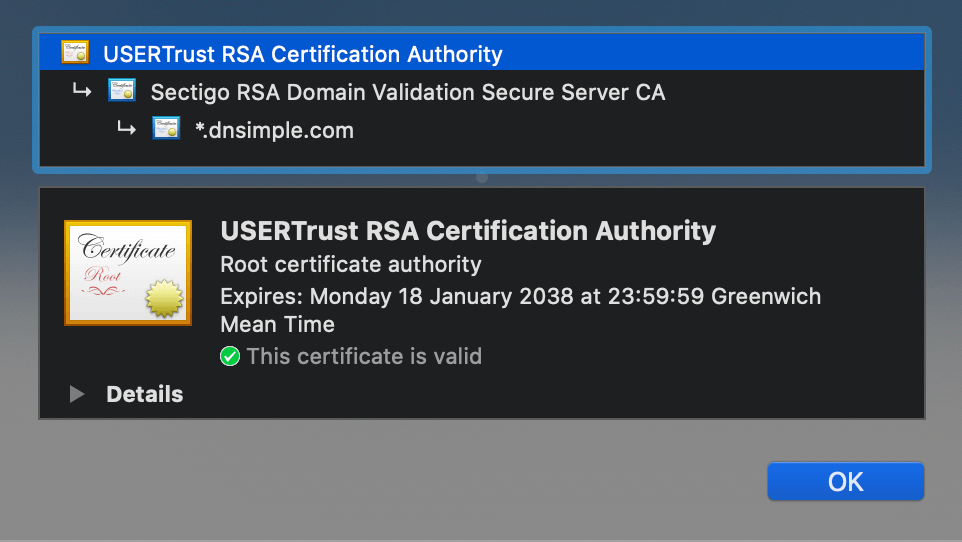
Example of an SSL Certificate chain
As an example, suppose you purchase a certificate from the Awesome Authority for the domain example.awesome.
Awesome Authority isn’t a root certificate authority. Its certificate isn’t directly embedded in your web browser, so it can’t be explicitly trusted.
- Awesome Authority utilizes a certificate issued by Intermediate Awesome CA Alpha.
- Intermediate Awesome CA Alpha utilizes a certificate issued by Intermediate Awesome CA Beta.
- Intermediate Awesome CA Beta utilizes a certificate issued by Intermediate Awesome CA Gamma.
- Intermediate Awesome CA Gamma utilizes a certificate issued by The King of Awesomeness.
- The King of Awesomeness is a Root CA. Its certificate is directly embedded in your web browser, therefore it can be explicitly trusted.
In our example, the SSL certificate chain is represented by 6 certificates:
- End-user Certificate - Issued to: example.awesome; Issued By: Awesome Authority
- Intermediate Certificate 1 - Issued to: Awesome Authority; Issued By: Intermediate Awesome CA Alpha
- Intermediate Certificate 2 - Issued to: Intermediate Awesome CA Alpha; Issued By: Intermediate Awesome CA Beta
- Intermediate Certificate 3 - Issued to: Intermediate Awesome CA Beta; Issued By: Intermediate Awesome CA Gamma
- Intermediate Certificate 4 - Issued to: Intermediate Awesome CA Gamma; Issued By: The King of Awesomeness
- Root certificate - Issued by and to: The King of Awesomeness
Certificate 1, the one you purchase from the CA, is your end-user certificate. Certificates 2 to 5 are intermediate certificates. Certificate 6, the one at the top of the chain (or at the end, depending on how you read the chain), is the root certificate.
When you install your end-user certificate, you must bundle all the intermediate certificates and install them along with your end-user certificate. If the SSL certificate chain is invalid or broken, your certificate won’t be trusted by some devices.
Why the complete chain is required
The certificate chain must be complete and unbroken for browsers to trust your certificate. When a browser validates your certificate, it follows the chain upward, verifying each certificate’s signature against its issuer. If any link in the chain is missing, the browser cannot verify the certificate’s authenticity and will display a security error.
What happens with an incomplete chain
If intermediate certificates are missing, the browser cannot trace the path from your certificate to a trusted root certificate. This breaks the chain of trust, causing browsers to display “Invalid certificate” or “certificate not trusted” errors, even though your certificate itself is valid.
Root certificates and browsers
Root certificates are embedded in web browsers and operating systems by their maintainers. You don’t need to install root certificates on your server because they’re already present in the client devices. The browser uses these pre-installed root certificates as the starting point for validating certificate chains.
Taking action
- Installing an SSL Certificate - Learn how to install your certificate and intermediate chain
- SSL Certificates with Apache - Apache-specific installation instructions
- SSL Certificates with NGINX - NGINX-specific installation instructions
Have more questions?
If you have additional questions or need any assistance with certificate chains and trust validation, just contact support, and we’ll be happy to help.
Related reading
- What is a Certificate Authority? - Understand the role of CAs in the certificate ecosystem
- What is a Root Certificate? - Learn about root certificates and trust anchors
- SSL Certificate Types - Explore different certificate types and their characteristics