Move a Domain to Another DNSimple Account
Last updated
Table of Contents
- Starting a move
- How the recipient can find their account identifier
- Completing the move
- Accepting a move
- Rejecting a move
- Domain cannot be pushed to another account
- Have more questions?
You can move a domain from one DNSimple account to another at any time from the DNSimple interface. This is sometimes called a transfer between accounts, but the domain stays at DNSimple: the registrar does not change. Moving a domain moves all associated resources, like DNS records, SSL certificates, and email forwards. Billing responsibility moves to the receiving account once the move is accepted.
Common reasons to move a domain include separating personal and business domains, handing a domain over to a client or a new owner, and bringing a domain bought through a partner such as ClickFunnels into your own account.
Note
Moving a domain between DNSimple accounts is different from transferring it to another registrar. To transfer a domain away from DNSimple, see Transfer a Domain Away from DNSimple.
If the domain uses domain trustee, the push flow may only prompt for extended attributes that still apply under that trustee configuration.
Working with a Reseller? Follow the steps in Accepting a move to get the domain into your account. If you cannot find a domain in your account, see I Can’t Find My Domain.
Warning
Once the move is accepted, anyone who previously had access to the domain in your account will no longer be able to manage the domain. When moving a domain to another DNSimple account, the domain’s registrant information will be updated to reflect the new account. This may result in the domain being locked from external transfers for 60 days.
Starting a move
Note
Once the domain is moved, you can no longer control it under your current account.
- Click on the relevant domain.
- Click the Settings tab on the left side.
- In the Move domain to another DNSimple account card, click Move.
You will be prompted to enter the Destination Account Identifier of the account that will receive the domain.
How the recipient can find their account identifier
- Open the account switcher in the top-right corner and select the correct account.
- From the account switcher, click Account Settings.
- On the left, make sure General is selected.
- The Account Identifier appears in the Account card on the right, under the account name and notification email. They should copy that value and share it with you.
Note
The Account Identifier was previously called the Domain Push Identifier, and before that the Account Token. Some providers, such as ClickFunnels, still use the old name. It is not an API account token.
Completing the move
- Enter the Destination Account Identifier.
- Click Move domain.
- A banner will appear confirming the request to push the domain.
Warning
Make sure to correctly enter the account identifier. Once the move has started, you will not be able to cancel it on your own if the identifier is incorrect. If the identifier is wrong and you need to cancel the move, contact support.
Accepting a move
If another DNSimple account holder (this includes Resellers) attempts to push a domain into your account, you have to accept it before it will be added. You will receive an email about the pending push, and the page shows a notice that you have a domain to review. Click .
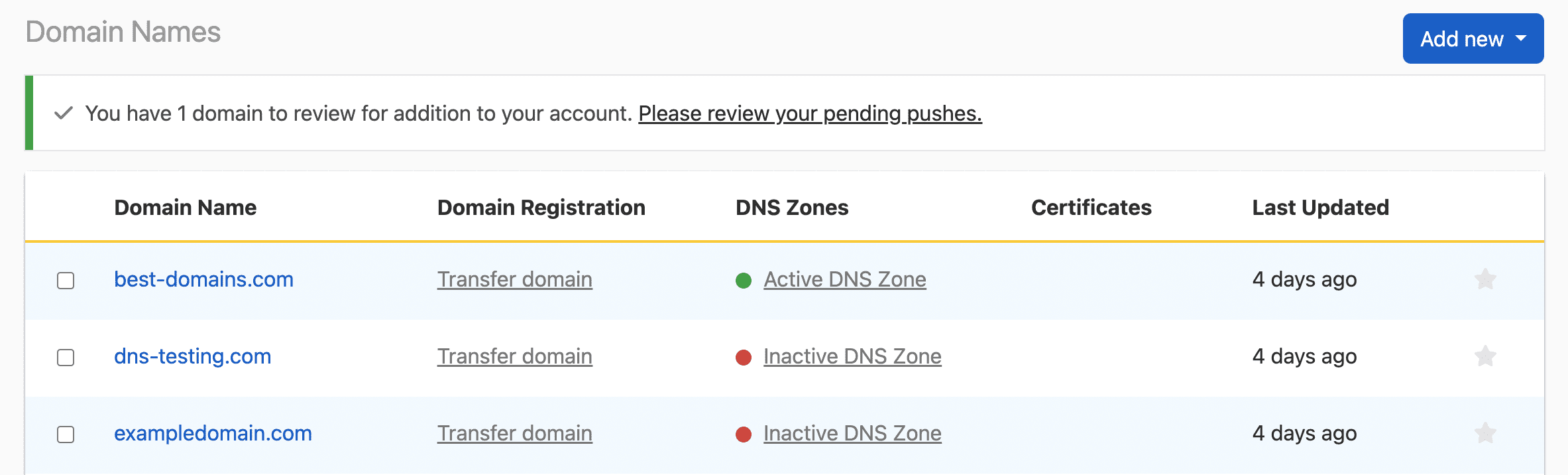
The page lists each pushed domain and the account that pushed it, with and buttons.

Click Accept. You will be prompted to assign a contact to the domain. This will typically be you or someone on your team. You can choose an existing contact or create a new one. After you have assigned a contact, the domain will be moved to your account. From there, you can configure it as needed.
Rejecting a move
To reject a move, click Reject on the list of pending pushes, and confirm that you want to reject the push.
Note
If you reject a move, the domain will remain in the possession of the original owner.
Domain cannot be pushed to another account
If you see the error This domain can’t be pushed to another account because the domain’s registrant can’t be changed, the domain’s TLD does not support changing the registrant through DNSimple. Moving a domain to another account changes its registrant, so the move cannot go ahead. Contact support for the options for that TLD.
Have more questions?
If you need any assistance moving domains to other DNSimple accounts or have more questions, just contact support, and we will be happy to help. You can also read more about domain registration at DNSimple.